Tuesday, 9 May 2017

How deadlock happens and how to avoid it ?


DEADLOCK SITUATION
When two threads are waiting for each other to get the lock and stuck for infinite time.
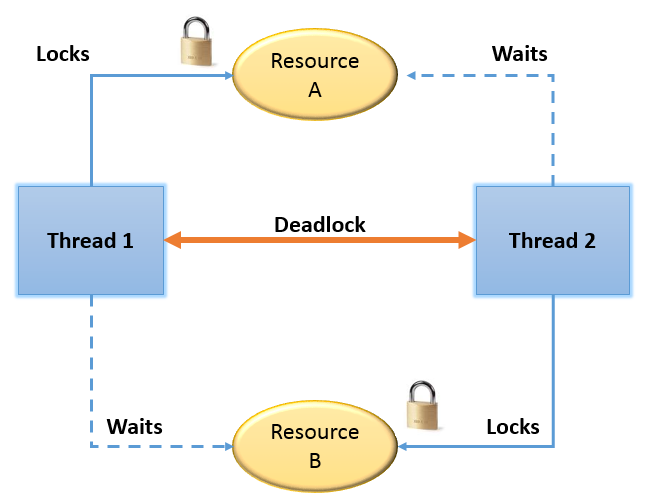
Image result for deadlock

REASON BEHIND DEADLOCK
Multiple threads are not the real cause of deadlock, instead the way in which threads are requesting the lock.
 

HOW DEADLOCK HAPPENS ?
1. When using nested synchronized blocks
OR
2. When one synchronized method called from other


ANALYZING DEADLOCK
1. Take thread dump using kill -3
OR
2. Use jconsole
It will print which thread is locked on which object.


CODE TO REPRODUCE DEADLOCK
public void m1() {
  synchronized(String.class) {
      System.out.println("inside block for String"); 
      synchronized(Double.class) {
           System.out.println("inside block for Double");
      }
  }
}

public void m2() {
  synchronized(Double.class) {
      System.out.println("inside block for Double"); 
      synchronized(String.class) {
           System.out.println("inside block for String");
      }
  } }


FIXING OR AVOIDING DEADLOCK
  • Provide ordered access to the object using synchronized blocks.
Below example will not lead to any deadlock because both methods are accessing lock on String and Double classes in same order.

public void m1() {
  synchronized(String.class) {
      System.out.println("inside block for String"); 
      synchronized(Double.class) {
           System.out.println("inside block for Double");
      }
  }
}

public void m2() {
  synchronized(String.class) {
      System.out.println("inside block for String"); 
      synchronized(Double.class) {
           System.out.println("inside block for Double");
  
      }
  }
}

Tuesday, 18 April 2017

How to use optional URL parameters ?


1. Add a search button on HTML to collect the searched name.
Name : <input type="text" ng-model="studentCtrl.name">
<button ng-click="studentCtrl.searchStudent()">Search</button>


2. Route config with Optional param "name" for new template for search and a controller

$routeProvider
   .when("
/studentSearch/:name?", {
      templateUrl: "templates/studentSearchDetails.html",
      controller: "
studentSearchController",
      controllerAs: "studentSearchCtrl"
   }) 


3. studentController will check searched value and call the new route defined

app.controller("studentController", function ($route, $http, $location) {
   var curr = this;
   curr.reloadData = function() {
      $route.reload();
   }
 

   curr.searchStudent = function() {
      if (curr.name) {

         $location.url("/studentSearch/" + curr.name);
      } else {
         $location.url("/studentSearch");
      }
   }


   $http.get("service/api/GetAllStudents").then(
     function(response) {
        curr.students = response.data
;
     }
   )
});


4. studentSearchController will check searched value and call the backend API to load data

app.controller("studentSearchController", function ($http, $routeParams) {
   var curr = this;


   if($routeParams.name) {
        $http({
        url: "service/api/GetStudentsByName",
        method: "get",
        params: { name: $routeParams.name }
     }).then(
        function(response) {
          curr.students = response.data
;
        }
     )

  } else {
     $http.get("service/api/GetAllStudents").then(
        function(response) {
           curr.students = response.data
;
        }
     )

  }
 
});


Tuesday, 11 April 2017

How to check different properties available in routes ?


In event function, print the parameters : event, next and current

app.controller("studentController", function ($route, $http, $rootScope, $log) {
   $rootScope.$on("$locationChangeStart",
function (event, next, current) {
       $log.debug("$locationChangeStart triggered...");

       $log.debug(event);
       $log.debug(next);
       $log.debug(current);
   })
 
   $rootScope.$on("$routeChangeStart", function (event, next, current) {
       $log.debug("$routeChangeStart triggered...");

       $log.debug(event);
       $log.debug(next);
       $log.debug(current);
   })
 

   var curr = this;
   curr.reloadData = function() {
      $route.reload();
   }

   $http.get("service/api/GetAllStudents").then(
     function(response) {
        curr.students = response.data
;
     }

   )
});


The data in next and current object for $routeChangeStart and $locationChangeStart are different.

Output
$routeChangeStart triggered...
Object {name: "$routeChangeStart", targetScope: m, defaultPrevented: false, currentScope: m}
Object {params: Object, pathParams: Object, $$route: Object}
Object {params: Object, pathParams: Object, $$route: Object, loadedTemplateUrl: "Templates/students.html", locals: Object...}
$locationChangeStart triggered...
Object {name: "$locationChangeStart", targetScope: m, defaultPrevented: false, currentScope: m}
http://localhost:8080/proj/trainings
http://localhost:8080/proj/students

What are different route change events ?


While navigating the routes, below events are triggered : 
  • $routeChangeStart
  • $routeChangeSuccess
  • $locationChangeStart
  • $locationChangeSuccess

app.controller("studentController", function ($route, $http, $rootScope, $log) {
   $rootScope.$on("$locationChangeStart",
function () {
       $log.debug("$locationChangeStart triggered...");
   })
 
   $rootScope.$on("$routeChangeStart", function () {
       $log.debug("$routeChangeStart triggered...");
   })
 

   $rootScope.$on("$locationChangeSuccess", function () {
       $log.debug("$locationChangeSuccess triggered...");
   })
 
   $rootScope.$on("$routeChangeSuccess", function () {
       $log.debug("$routeChangeSuccess triggered...");
   })

   var curr = this;
   curr.reloadData = function() {
      $route.reload();
   }

   $http.get("service/api/GetAllStudents").then(
     function(response) {
        curr.students = response.data
;
     }

   )
});


Output
$routeChangeStart triggered...
$locationChangeStart triggered...
$locationChangeSuccess triggered...
$routeChangeSuccess triggered...