Saturday, 26 August 2017

What are the features provided by HAProxy ?


Basic features provided by HAProxy
Proxying

  • Protect server against any client-side attack
  • Listen to multiple IP address/ports

SSL

  • Certificate-based client authentication
  • Multi-hosting with no limit on sites count
  • Support for wildcard certificates

Monitoring

  • focuses a lot on availability, Servers state is continuously monitored
  • Various check methods are available : TCP connect, HTTP request, SMTP hello, SSL hello, LDAP, SQL, Redis, send/expect scripts, all with/without SSL

High availability

  • Ensure the best global service continuity
  • Only valid servers are used
  • Backup servers are automatically used when active servers are down. Replace them so that sessions are not lost when possible.
  • Support for a graceful shutdown without affecting any connection
  • Return a global failed status for a farm when too many servers are down.

Load balancing

  • offers a complete set of load balancing features
  • 9 LB algorithms are supported including :
    • round-robin (for short connections, pick each server in turn)
    • leastconn (for long connections, pick the least recently used of the servers with the lowest connection count)
    • source (for SSL farms or terminal server farms, the server directly depends on the client's source address)
    • uri (for HTTP caches, the server directly depends on the HTTP URI)
    • hdr (the server directly depends on the contents of a specific HTTP header field)
    • first (for short-lived virtual machines, all connections are packed on the smallest possible subset of servers so that unused ones can be powered down)
  • All algorithms support per-server weights
  • Dynamic weights are supported for round-robin, leastconn and consistent hashing where server weights is modified on the fly from the CLI or even by an agent running on the server
  • Slow-start is supported in case of dynamic weight which allows a server to progressively take the traffic
Stickiness
Application load balancing would be useless without stickiness.
  • It ensures to maintain a visitor on the same server even across various events such as server addition/removal, down/up cycles
  • Stickiness info can be individually matched and learned from different places if desired.
    • For example a JSESSIONID may be matched both in a cookie and in the URL.
  • Stickiness information can come from anything that can be seen within a request or response, including source address, TCP payload offset and length, HTTTP query string elements, header field values, cookies, and so on...
  • Stick-tables are replicated between all nodes in a multi-master fashion
  • Possible to decide not to stick to certain servers, such as backup servers, so that when the nominal server comes back, it automatically takes the load back.
  • The server may decide to change or clean the stickiness cookie on logout, so that leaving visitors are automatically unbound from the server
  • Multiple server entries may share the same stickiness keys so that stickiness is not lost in multi-path environments when one path goes down
Maps
  • Maps are a powerful type of converter consisting in loading a two-columns file into memory at boot time, then looking up each input sample from the first column and either returning the corresponding pattern on the second column if the entry was found, or returning a default value.
ACLs and conditions
  • Most operations in HAProxy can be made conditional.
  • Conditions are built by combining multiple ACLs using logic operators (AND/OR/NOT).
Content switching
  • Content-based switching is the principle is that a connection or request arrives on a frontend, then the information carried with this request or connection are processed, and at this point it is possible to write ACLs-based conditions making use of these information to decide what backend will process the request.
Formated strings
  • Possible to manipulate character strings, such as logs, redirects, header additions, and so on.
  • This provides a powerful way to build header contents or to customize log lines.
HTTP rewriting and redirection
  • Requests / response headers can be adjusted to make the LB appear as the origin server and to fix hardcoded information.
  • This comes with changing the path in requests (which is strongly advised against), modifying Host header field, modifying the Location response header field for redirects, modifying the path and domain attribute for cookies, and so on.
  • Sometimes LB have to intercept some requests and respond with a redirect to a new target URL.
    (Rewriting makes the client and the server see different things while Redirects ask the client to visit the new URL so that it sees the same location as the server.)
Server protection
  • Protect servers against overloading and attacks.
  • HAProxy contains buffers to store requests and responses, and that by only sending a request to a server when it's complete and by reading the whole response very quickly from the local network, the server side connection is used for a very short time and this preserves server resources as much as possible.
  • When a protocol violation or attack is detected, there are various options to respond to the user, such as returning the common "HTTP 400 bad request", closing the connection with a TCP reset, faking an error after a long delay ("tarpit") to confuse the attacker.
 
Logging
  • Very detailed logs, with millisecond accuracy and the exact connection accept time that can be searched in firewalls logs.
  • Detailed logs containing everything needed for troubleshooting, such as source IP address and port, frontend, backend, server, timers (request receipt duration, queue duration, connection setup time, response headers time, data transfer time), global process state, connection counts, queue status, retries count, detailed stickiness actions and disconnect reasons
    Header captures with a safe output encoding.
 
Statistics
  • provides a web-based statistics reporting interface with authentication, security levels and scopes.
  • Possible to provide each hosted customer with his own page showing only his own instances.
 

Friday, 25 August 2017

At what levels Load balancers works ?


Load Balancers may act at different levels :

1. Link level - Link LB
  • Chooses what network link to send a packet to.
  • Acts at the packet level.
    Installed on the normal path of the traffic and divert it according to the configuration.
  • 1-to-1 relation between input and output packets
  • usually implemented in hardware (ASICs) allowing to reach line rate
  • Return traffic doesn't necessarily pass through the LB.
    The LB may also replace the packets' source address with its own in order to force the return traffic to pass through it
2. Network level - Network LB
  • Chooses what route a series of packets will follow.
  • Acts on session contents.
    Operations are always stateful. Return traffic must pass through the LB. 
  • Generally performed by proxies and they're often called Layer 7 LB or L7Clients and servers are not required to use the same protocol (for example IPv4 vs IPv6, clear vs SSL). No relation between input and output packets sizes nor counts.
  • Generally achieved by pure software, even if embedded into hardware appliances. 
  • Very well suited for server load balancing

3. Server level - Server LB
  • decides what server will process a connection or request.
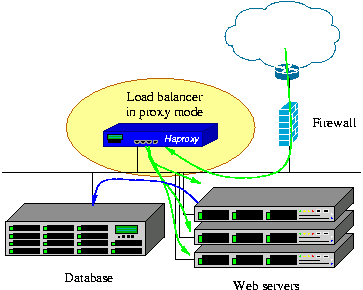
  • Proxy-based LB are deployed as a server with their own IP address and ports. 
  • Some LB may have to adjust some servers' responses to make this possible (eg: the HTTP Location header field used in HTTP redirects).

Thursday, 24 August 2017

What is Load balancing ?


Load balancing


Aggregated multiple components in order to achieve a total processing capacity above individual capacity, in a scalable way.
It allows more operations being performed simultaneously by the time it takes a component to perform only one.
 

Using LB a single operation :
  • will still be performed on a single component at a time
  • will not get faster than without load balancing.

It always requires at least as many operations as available components to make use of all components and to fully benefit from the load balancing.
 

Real world example 
Number of lanes on a highway which allows as many cars to pass during the same time frame without increasing their individual speed.
Examples of load balancing

  • Process scheduling in multi-processor systems
  • Link LB (eg: EtherChannel, Bonding)
  • IP address LB (eg: ECMP, DNS roundrobin)
  • Server LB (via Load balancers)

Load balancer
The mechanism or component which performs the load balancing operation.

What is HAProxy and what is not ?


HAProxy
Free, very fast and reliable solution for :
  • HA (High Availability)
  • Load balancing - suited for very high traffic web sites
  • Proxying


It can load balance any TCP service, particularly suited for HTTP as it supports session persistence and layer 7 processing.

Usage
  • De-facto standard
  • Open source
  • Shipped with most mainstream Linux distributions
  • Often deployed by default in cloud platforms


HAProxy is :
  • TCP Proxy 
    • Accept a TCP connection from a listening socket, connect to a server.
    • Allows traffic in both directions
  • HTTP RP
    • Also called Gateway
    • As a server, receives HTTP requests and passes the requests to servers
  • Server load balancer
    It can load balance TCP connections and HTTP requests
    • TCP mode : Load balancing decisions are taken for the whole connection.
    • HTTP mode : Decisions are taken per request.

  •  Content-based switch 
    • Any element from the request can decide what server to pass the request or connection to. 
    • Makes possible to handle multiple protocols over a same port (eg: http, https, ssh)
  • SSL terminator / initiator / offloader
    • SSL/TLS may be used on the connection coming from the client / to the server / both side
  • TCP normalizer 
    • Protects abnormal traffic - invalid packets, flag combinations, window advertisements, sequence numbers, incomplete connections (SYN floods)
  • HTTP normalizer
    • When configured to process HTTP traffic, only valid complete requests are passed.
    • protects against a lot of protocol-based attacks
  • HTTP fixing tool
    • can modify / fix / add / remove / rewrite the URL or any request or response header
    • helps fixing interoperability issues in complex environments
  • Traffic regulator
    • can apply some thresholds, which protects the servers against overloading
    • adjust traffic priorities based on the contents
  • A protection against DDoS and service abuse
    • Detect when an abuse is happening, then take action (slow down the offenders, block them, send them to outdated contents, etc).
  • HTTP compression offloader
    • It can compress responses which were not compressed by the server, thus reducing the page load time for clients with poor connectivity or using high-latency, mobile networks.

HAProxy is not :
  • Explicit HTTP proxy
    proxy that browsers use to reach the internet. Like, Squid
  • Caching proxy
    returns as-is the contents its received from the server. Like, Varnish
  • Data scrubber
    It will not modify the body of requests nor responses.
  • Web server
    During startup, it isolates itself inside a chroot jail and drops its privileges, so that it will not perform any single file-system access once started.
    So, it cannot be turned into a web server. Like, Apache or Nginx
  • Packet-based LB
    It will not see IP packets nor UDP datagrams and will not perform NAT or even less DSR. Like, IPVS (Linux Virtual Server) 
     

Thursday, 3 August 2017

What is BDD and How to implement using Cucumber ?


Cucumber
  • A testing framework which supports BDD.
  • Define your application behavior in plain english language.
    • Grammer is defined by Gherkin langauge


Challenges with TDD 
Normally, developers develops features but write test code later. Due to need of release, he does quick but inefficient testing.  
Test-cases focus on the functionality of its integration.


BDD
  • Takes care of workflow in place of functionality.
  • Application is designed by describing its behavior for outside observer.
  • Behavior is written in readable and understandable language.
  • Behavior is defined in Given-When-Then steps.

Gherkin
Business-readable domain specific language
Understandable for BA, testers and customer perspective
Allows creating precise acceptance criteria

Example
Scenario: Eat 5 out of 12 
Given there are 12 cucumbers 
When I eat 5 cucumbers
Then I should have 7 cucumbers 


Feature file
consists following components :  
1. Feature: Description of the current test script which has to be executed.
2. Scenario: Description of the steps and expected outcome for a particular test case.
3. Scenario Outline: Same scenario can be executed for multiple sets of data using scenario outline. The data is provided by a tabular structure separated by |
4. Given: Context of the text to be executed. By using data tables "Given", step can also be parameterized.
5. When: Test action that has to performed
6. Then: Expected outcome of the test can be represented by "Then"


STEP DEFINITION
It maps the test case steps in the feature files (introduced by Given/When/Then) to code, which executes and checks the outcomes from the system under test.


Monday, 17 July 2017

How to search multiple keywords in a file ?


Use egrep command

egrep -e '^TEXT|^TEXT|TEXT' <file>

egrep -e '^bind| port |pidfile|^logfile' /opt/redis/etc/8000.conf

It will search and give lines corresponding to given keywords :
bind 3200
listen port 800
master pidfile /logs/a.pid
logfile mylogs.log

Tuesday, 9 May 2017

How deadlock happens and how to avoid it ?


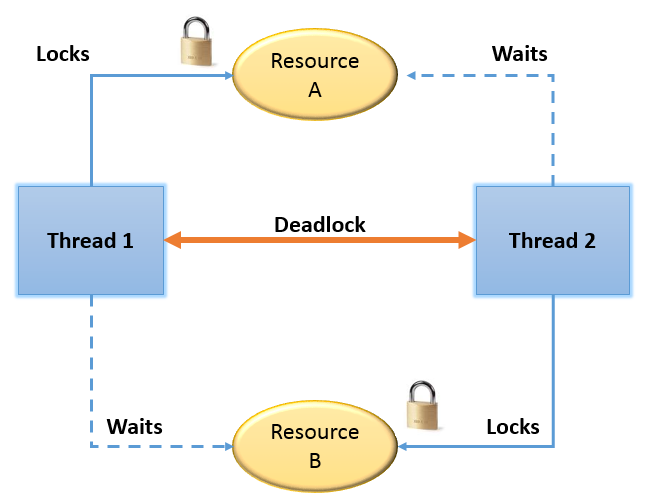
DEADLOCK SITUATION
When two threads are waiting for each other to get the lock and stuck for infinite time.
Image result for deadlock

REASON BEHIND DEADLOCK
Multiple threads are not the real cause of deadlock, instead the way in which threads are requesting the lock.
 

HOW DEADLOCK HAPPENS ?
1. When using nested synchronized blocks
OR
2. When one synchronized method called from other


ANALYZING DEADLOCK
1. Take thread dump using kill -3
OR
2. Use jconsole
It will print which thread is locked on which object.


CODE TO REPRODUCE DEADLOCK
public void m1() {
  synchronized(String.class) {
      System.out.println("inside block for String"); 
      synchronized(Double.class) {
           System.out.println("inside block for Double");
      }
  }
}

public void m2() {
  synchronized(Double.class) {
      System.out.println("inside block for Double"); 
      synchronized(String.class) {
           System.out.println("inside block for String");
      }
  } }


FIXING OR AVOIDING DEADLOCK
  • Provide ordered access to the object using synchronized blocks.
Below example will not lead to any deadlock because both methods are accessing lock on String and Double classes in same order.

public void m1() {
  synchronized(String.class) {
      System.out.println("inside block for String"); 
      synchronized(Double.class) {
           System.out.println("inside block for Double");
      }
  }
}

public void m2() {
  synchronized(String.class) {
      System.out.println("inside block for String"); 
      synchronized(Double.class) {
           System.out.println("inside block for Double");
  
      }
  }
}